

Checking CITI Completion Dates
It is important when filling in your CITI completion dates on forms or disclosures that the most recent completion date is reflected. Only put in the completion date from your Completion Certificate or Completion Date listed in CITI Program. In order to check this please refer to the steps below:
1. Login to CITI Program
2. Click "View Courses" when on the My Courses CITI Page
3. Scroll to find the training name under Completed Courses
Note that if the course requires a refresher and is expired, the course refresher will appear in the Courses Ready to Begin section before your Completed Courses section.
4. After finding the record, click the yellow View - Print - Share Record button
5. Find the Completion Certificate section
6. Click on View / Print under Completion Certificate
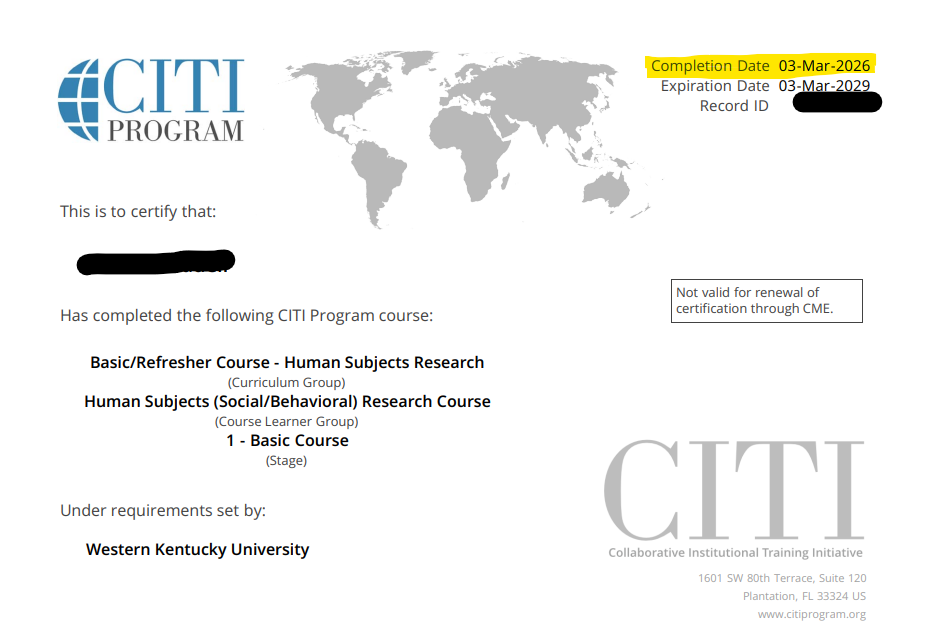
In the top right hand corner you will see Completion Date, see the example highlighted in yellow below. When completing forms please only use this date.
Some of the links on this page may require additional software to view.